Pet Care Planner for Creative KDP Success
A well-organized planner can transform how pet owners manage daily care, vet visits, feeding schedules, and grooming routines. The Pet Care Planner KDP Interior Template offers a ready-to-use foundation for creating a practical, visually consistent planner that resonates with pet lovers. Whether you are building a low-content book business on Amazon KDP or preparing a printable for direct sale, this template provides a structured starting point that saves time while allowing room for creative customization.
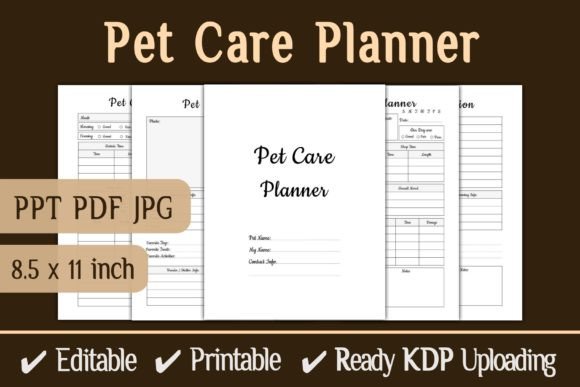
The complete package includes an editable PowerPoint file, a print-ready PDF, and high-resolution JPG files. With 120 pages at 8.5 × 11 inches and no bleed, this interior is designed for straightforward uploading to KDP or direct printing. For creators who want to deliver value without starting from scratch, this template balances flexibility with efficiency.
What Makes This Template Interesting for Creators and Pet Owners
At its core, the Pet Care Planner KDP Interior Template is a practical tool that helps pet owners track health, appointments, meals, and daily habits. But for designers, publishers, and entrepreneurs, it represents an opportunity to launch a niche product quickly. Pet care is a passionate category: owners invest time and money in their animals’ wellbeing, and a dedicated planner appeals to their desire for organization and care.
The template uses a clean, uncluttered layout. It avoids overly decorative elements that could distract from usability. This makes it suitable for a wide range of pets—dogs, cats, birds, small mammals—and allows buyers to fill in specific details relevant to their situation. The neutral structure also makes it easy for you to adapt the design to different audiences, such as cat owners or multi-pet households.
The availability of multiple file formats simplifies workflow. You can edit the PowerPoint file to add your branding, change fonts, or adjust colors. The PDF is ready for immediate upload, and the JPGs allow for quick previews or cover mockups. This flexibility is especially useful for creators who want to test different variations without redoing layout work.
Creative Possibilities and Variations
While the template comes with a defined page count and dimensions, you can reshape it to fit different niches or marketing angles. Here are several directions to consider:
- Cat-specific planners: Adapt the template by including sections for litter box tracking, indoor activity logs, and favorite perch locations. Cat owners often prioritize behavior tracking, vet reminders, and diet notes. You can customize headers and section titles to reflect feline care.
- Multi-pet household trackers: Expand the template by adding repeated sections for each pet. For example, allocate 20 pages per animal with dedicated space for feeding schedules, vaccination records, and weekly notes. This makes the planner valuable for owners with several dogs, cats, or other animals.
- Senior pet care journals: Older pets have unique needs—medication schedules, mobility changes, and more frequent vet visits. Tailor the planner to include pain tracking, weight monitoring, and daily comfort observations. This positions your product as a specialized tool for a growing demographic.
- Grooming and spa logs: For owners who prioritize coat care, nail trims, and baths, create a version that focuses on grooming appointments and product lists. You can add checkboxes for each service and notes on skin or fur condition.
- Seasonal and travel editions: A summer-themed planner might emphasize hydration, heat safety, and travel checklists. A winter version could highlight indoor enrichment and cold-weather walks. Seasonal editions refresh your catalog and attract repeat buyers.
Each variation builds on the template’s original structure. The editing process remains simple because the PowerPoint file allows you to modify text blocks, reorder pages, or insert additional tables. You can also use the JPG files as base images for cover designs or social media mockups.
How Different Users Adapt the Template
The Pet Care Planner KDP Interior Template serves multiple audiences. Here is how specific users might approach it:
- KDP publishers: Upload the PDF directly or after minor edits to align with your brand. Use the 120-page count as a standard interior for paperbacks. Add your own cover design and description that targets pet owners who value organization. You can price competitively because the template reduces your development time.
- Print-on-demand sellers: If you sell through platforms beyond Amazon, such as Etsy or Gumroad, the JPG and PDF files give you immediate download options. You can bundle the planner with bonus checklists or a digital sticker set. The editable PPT file also lets you offer customization services—for example, adding a pet’s name to the cover.
- Independent pet businesses: Groomers, trainers, and veterinarians can use the template as a client handout or digital download. Add your logo and contact information to create a branded resource. This builds trust and positions your business as helpful beyond core services.
- Content creators and bloggers: Use the planner as a lead magnet or freebie to grow your email list. Since it is print-ready, subscribers can download and use it immediately. You can also create a video series demonstrating how to fill the planner, which drives engagement and traffic.
- Educators and hobbyists: Pet care classes, 4-H groups, or rescue organizations can adapt the planner into a worksheet or training journal. The simple layout makes it easy to print multiple copies for group use.
Practical Tips for Keeping Your Planner Clear and Effective
When you work with a template, small adjustments can improve usability and appeal. Here are recommendations based on common buyer expectations:
Design for Real Use
Pet owners use planners in practical settings—next to the food bowl, in the car, or at the vet’s office. Ensure that sections are clearly labeled and that there is enough space to write. Avoid overly tight margins or small font sizes. Because the template is 8.5 × 11 inches, you have room to include tables and checklists without crowding. If you edit the PowerPoint file, test a printed page to confirm that text is legible.
Maintain Consistent Organization
Each section should follow a predictable structure. For example, if you include a weekly log, keep the same layout across all 52 weeks. Consistency reduces confusion and makes the planner feel professional. Use headers that group similar content—such as “Daily Care,” “Vet Visits,” and “Notes.” The template already provides a framework, but you can refine it to match your audience’s workflow.
Add Original Touches Without Overcomplicating
You want your planner to stand out, but added elements should serve a purpose. Consider inserting a page for emergency contacts, a list of local pet services, or a quick reference for common symptoms. These extras add value without bloating the design. Avoid decorative clip art that distracts from the planner’s function. Aim for a clean, modern look that appeals to adults aged 20–50 who appreciate efficiency.
Test Your Files Before Publishing
KDP requires interiors to meet specific formatting guidelines. Since this template includes “no bleed,” you can upload the PDF directly. However, always preview your file in Amazon’s Kindle Create or a PDF viewer. Check that page numbers align, that margins are even, and that no content is cut off. For direct print, test a sample on your home printer or a local print shop. Small errors can affect buyer satisfaction, so invest time in quality assurance.
Consider Your Audience’s Next Steps
Pet planners often lead to repeat purchases. If a buyer finds your planner useful, they may look for companion products—such as a health record book, a training log, or a meal prep worksheet. You can design a series that uses a consistent interior style. The template’s editing flexibility allows you to create multiple related products without reinventing the layout each time.
Adapting the Template for Different Platforms and Formats
The Pet Care Planner KDP Interior Template works across print and digital channels. Here are adaptation strategies for each platform:
Amazon KDP
Upload the PDF directly with a compelling cover and keyword-rich description. Use titles and subtitles that include relevant terms like “cat care planner” or “pet health journal” to attract search traffic. Keep the interior simple to avoid formatting issues. The 120-page count is suitable for a standard paperback price point, and you can expand or shrink pages in the PPT file if needed.
Etsy and Direct Sales
Offer the planner as an instant download. Include the JPG preview so customers can see the layout before purchasing. You can also sell the editable PowerPoint file as a separate product, allowing buyers to personalize their planner. Bundle the PDF with a cover page and instructions for a polished package.
Print-on-Demand through Third-Party Companies
If you use services like IngramSpark or Lulu, the PDF and JPG files give you flexibility. You may need to adjust the trim size or add bleed for specific printers, but the no-bleed format works for many standard options. Always verify each printer’s requirements before uploading.
Digital Use for Mobile or Tablets
Some buyers prefer a digital planner they can fill on their tablet. You can convert the PDF into a fillable form using software like Adobe Acrobat. Alternatively, provide the JPG files as a background for note-taking apps like GoodNotes. This extends your product’s reach beyond print buyers.
Balancing Inspiration with Practicality
Creativity in planner design often comes from understanding what users actually need. Pet owners want to remember vaccination dates, track weight changes, and log behavioral shifts. The template already provides a framework for these tasks. Your job is to enhance it with small touches that feel thoughtful without being overwhelming.
For example, you could add a monthly checklist for parasite prevention or a space for attaching a pet’s photo. These additions require minimal editing but create a more personal experience. When you focus on genuine usefulness, your product gains credibility and attracts positive reviews.
The same principle applies to marketing. Instead of promising that your planner will “transform” pet care, highlight how it simplifies daily routines and reduces stress. Buyers in the 20–50 age range often juggle busy schedules, so efficiency and clarity matter more than decorative flair. Use the template as a tool to deliver real value, not just visual appeal.
Keeping Content Original and Audience-Friendly
To stand out in a crowded KDP marketplace, your planner needs a unique angle. While the template provides a base, your version should reflect your understanding of pet owners. Research common pain points: forgetting flea treatments, losing vaccination records, or tracking meds across multiple animals. Address these directly in your layout and copy.
You can also differentiate by language and tone. Use headings that speak to pet parents, such as “Today’s Feeding Log” or “Weekly Wellness Check.” Avoid jargon that might confuse first-time planner users. A friendly, direct voice builds connection and makes the product feel approachable.
Finally, respect buyer expectations. If you promise a 120-page interior, ensure every page offers value. Skip filler content that pads the page count without helping the user. The template’s efficient design helps you avoid this trap, as each section is already oriented toward practical tracking.
Final Thoughts on Using This Template
The Pet Care Planner KDP Interior Template supports a range of creative and commercial goals. Whether you are launching your first low-content book or expanding an existing catalog, the editable files give you control over final output. By focusing on clarity, consistency, and genuine pet owner needs, you can produce a planner that feels intentional and useful.
Take advantage of the included formats to test different angles—cat care, multi-pet logs, or seasonal editions. Small tweaks in design and wording can attract different buyer groups. At the same time, maintain the template’s original strengths: clean organization, print-ready preparation, and straightforward editing.
As you develop your product, keep the user’s experience central. A well-made pet planner becomes a trusted companion for owners who want the best for their animals. With this template, you have a solid foundation to build something that meets that need and supports your creative business goals.