Editable Digital Social Media Planner for Every Creator
Keeping up with social media can feel like a task of its own. Between brainstorming posts, tracking analytics, and maintaining a consistent brand voice, the workload adds up quickly. An Editable Digital Social Media Planner helps you organize everything in one place without the clutter of loose notes or messy spreadsheets. This type of planner is designed to be customized, reused, and adapted to your changing needs, whether you manage one account or several.
Unlike a printed notebook, an editable digital version lives inside a platform like Canva, where you can rearrange pages, change colors, and update content without starting over. What makes it especially useful is that it comes with a ready-to-use structure while still leaving room for your personal touch. You can edit it easily using a free Canva account, which means no expensive software is required. The planner is delivered as high-quality print-ready PDF files and JPEG files, along with editable Canva links that let you modify the templates as you wish.
A small but important detail is to ensure the original link stays active. When you open the template in Canva, go to your Canva home screen and make a copy into your own account before editing. That way, you always have the original version to revisit if needed.
What Exactly Is Inside an Editable Digital Social Media Planner
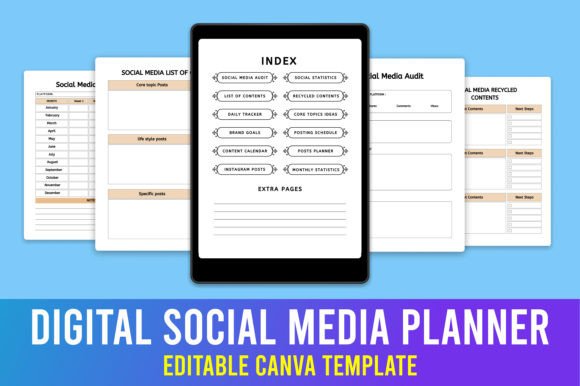
This type of planner typically includes a set of structured pages that cover the full cycle of social media management. The checklist includes a page for basic information about yourself or your brand, an index for quick navigation, and a section for a social media audit. You will find spaces to record social media statistics, a table of contents, and a page where you can plan how to recycle older content that still performs well.
A daily tracker helps you stay on top of posting habits, while core topic idea sheets let you brainstorm themes that align with your brand. Brand goals and a posting schedule keep your strategy focused, and a content calendar allows you to map out posts weeks in advance. There are dedicated planner pages for Instagram posts, monthly statistics sheets, and extra dotted daily notes pages for random ideas or reminders.
The files include 20 different Canva templates, all at print dimensions of 8.5 by 11 inches. Colors are set to CMYK with 300 DPI for crisp printing, and there is no bleed, so it works well both on screen and on paper. This combination makes it suitable for digital planning as well as printed binders.
Why Different People Care About This Planner
A social media planner is not just for professional marketers. It can be equally valuable for a freelancer juggling multiple client accounts, a small business owner who handles their own promotions, or a blogger looking to grow their audience. Each person brings a different priority to the table, and an editable digital planner can adapt to those differences.
Beginners often care most about ease of use and structure. When you are new to social media strategy, having a pre-made layout that guides you through an audit, goal setting, and content recycling removes a lot of guesswork. You do not need to design anything from scratch. You simply open the template, read the prompts, and start filling in your ideas. For example, a beginner blogger might use the core topics page to list five consistent themes for their niche, then use the daily tracker to build a simple posting habit.
Experienced users and professionals value flexibility and depth. A social media manager handling multiple clients might appreciate the recycling content page, which helps repurpose top-performing posts across different platforms. The ability to duplicate pages in Canva and rename them for each client means the same set of templates can serve many projects. Monthly statistics sheets allow tracking performance over time, which is useful for reporting to clients or adjusting strategy.
Creators and educators often look for learning value and presentation quality. A course creator teaching social media skills can use the planner as a teaching tool, showing students how to structure their own content calendars. Because the templates are editable, the educator can customize examples to fit the current lesson. The high-quality PDF and JPEG outputs also mean the planner can be shared as a resource or printed as a handout.
Priorities That Shape Your Experience
When choosing or using a planner like this, different priorities matter depending on what you need most. Cost is often a top concern for freelancers and small business owners. Since you can edit everything using a free Canva account, there is no monthly subscription for design software. The planner itself is a one-time resource that you can reuse season after season by simply making a new copy.
Reliability and long-term usefulness come into play for those who want to build a consistent system. Having an index and table of contents means you can quickly find last month's statistics or revisit your brand goals without flipping through pages aimlessly. The dotted daily notes pages also give you space for reflections or spontaneous ideas, which keeps the planner from feeling too rigid.
Speed matters when you have limited time. A busy entrepreneur might open the content calendar, drop in a few pre-planned posts, and then forget about scheduling until the next week. The planner reduces the need to create a new organizational system each time you sit down to plan. Everything is already laid out in a logical order, so you can move from audit to posting schedule in minutes.
Creativity and visual presentation are more important for those who treat their planner as a brand asset. Because the templates are fully editable in Canva, you can change colors, fonts, and backgrounds to match your brand identity. A lifestyle influencer might use warm tones and handwritten-style fonts, while a tech consultant could prefer clean lines and neutral colors. This visual consistency helps the planning process feel aligned with the brand you present to your audience.
Practical Examples for Different Reader Types
A small business owner who sells handmade products might use the social media audit page to review which platforms have driven the most sales. They could then set brand goals focused on increasing engagement on Instagram, where their audience is most active. The posting schedule would include product launches, behind-the-scenes content, and customer testimonials. The recycle content page helps them reshare popular product photos with new captions, saving time while maintaining visibility.
A freelancer managing social media for three different clients could create separate copies of the planner for each client. The index page helps them jump between audits, calendars, and statistics without mixing up notes. Monthly statistics allow them to track follower growth and engagement rates, which they can include in monthly reports to clients. The editable Canva links make it easy to update the brand colors for each client’s planner in under a minute.
A beginner who wants to start a personal blog might use the planner to define their brand goals first, such as publishing twice a week and reaching 500 followers in three months. The core topics page helps them brainstorm consistent themes, like recipes, travel tips, or productivity hacks. The daily tracker keeps them accountable, and the dotted notes pages are perfect for jotting down caption ideas while commuting.
An educator teaching a digital marketing course could assign the planner as a semester project. Students would complete the audit, set goals, and fill out a content calendar for a fictional brand. Because the templates are editable, the educator can provide feedback by copying the student's planner and adding comments inside Canva. This hands-on approach reinforces strategic thinking without requiring students to learn complex design tools.
Matching the Planner to Your Own Goals and Skill Level
Before you decide whether this type of planner fits your needs, take a moment to consider your current situation. If you are just starting out and feel overwhelmed by the idea of planning content, a structured template can give you a clear starting point. The built-in prompts guide you through each step, so you do not have to invent a system from scratch.
If you already have an established workflow, ask yourself whether this planner adds something you currently miss. Maybe you lack a dedicated space for recycling content, or you want to track monthly statistics more consistently. The flexibility of editing the templates means you can remove pages you do not need and duplicate the ones you use most.
For those who value print quality, the CMYK color and 300 DPI resolution ensure that pages look professional when printed. If you prefer to plan entirely on screen, the JPEG files and Canva links let you keep everything digital. You can even use the planner on a tablet with a note-taking app if you import the PDF or JPEG files.
One important note is to always make a copy of the original template before editing. This preserves the link to the original design so you can return to it later or reuse it for a new project. Canva makes this straightforward, and once you get into the habit, it becomes second nature.
Long-Term Value and Practical Use
A planner like this is not a one-time tool. Because it is editable, you can update it each season, change your brand colors, or adapt it for new projects. The 20 different templates give you variety without requiring you to design each page individually. Over time, the planner becomes a reference document that holds your brand goals, content history, and performance data all in one place.
Whether you are a creator documenting your journey, a professional building a client management system, or a hobbyist organizing your personal account, the core benefit remains the same. You save mental energy by having a reliable structure, and you gain clarity by seeing your content plan laid out visually. The editable digital format means you are not locked into someone else's design choices, and the print-ready files mean you can hold a physical copy in your hands if that helps you think better.
The combination of digital flexibility and print quality makes this planner suitable for a wide range of situations. If you have ever felt scattered trying to manage posts across different platforms, or if you have struggled to keep track of what worked and what did not, a structured planner can bring order to that chaos. And because you can edit every part of it, the planner grows with you as your skills and needs evolve.