DMC Color Charts & 456 RGB Codes
If you’ve ever matched a physical DMC thread to a screen color and felt the result looked off, you know exactly why a reliable color reference matters. The DMC Color Charts and 456 RGB Codes digital resource bridges that gap between tactile thread samples and digital design work. It’s not just a list of numbers—it’s a practical tool for anyone who needs consistent, reproducible color across embroidery, branding, print, and web projects.
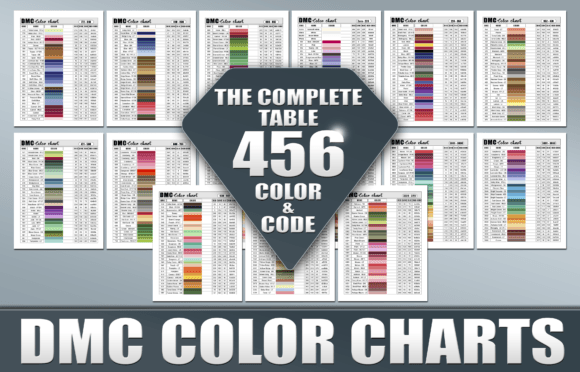
This downloadable package gives you 16 pages, each laid out with 30 columns of real thread sample photos. All 456 DMC colors are represented, alongside their RGB codes, official names, and DMC numbers. The file comes in PDF, PNG, and JPG formats, so you can use it in almost any workflow without converting or compromising quality.
What Makes This Color Chart Different
Most color charts you find online are flat digital swatches—blocks of color that approximate what a thread looks like. This one uses actual photographs of DMC threads. The texture, sheen, and slight variation you’d see under natural light are captured in each sample. That might sound like a small detail, but for designers and crafters who care about how a color behaves in different contexts, it changes everything.
The 456 RGB codes are equally important. They give you a direct, digital reference point so you can match embroidery floss to screen elements—logos, website backgrounds, social media graphics—without guesswork. Whether you’re a brand strategist ensuring thread colors align with a hex palette or a publisher proofing printed materials, having both the physical photo and the RGB value in one place saves time and prevents costly mismatches.
The layout itself is functional: 30 columns per page means you can scan horizontally and compare shades quickly. The key at the bottom of each page ties the DMC number, name, and RGB code together, so you never have to flip back and forth between references. That kind of thoughtful structure matters when you’re deep in a project and need fast answers.
Where This Resource Works Best
The audience for this is broad, but the use cases fall into a few clear categories. Here’s where the DMC Color Charts and 456 RGB Codes delivers the most value:
- Embroidery and cross-stitch design. If you’re digitizing patterns or converting artwork to thread, having accurate RGB references means your computer previews match the finished piece. No more ordering floss only to realize the color is too warm or too muted.
- Brand identity work. When a brand’s color palette includes specific DMC shades—maybe for packaging, promotional items, or embroidered logos—you need consistency across every medium. This chart gives you the digital bridge to maintain that consistency from screen to stitched product.
- Print and editorial design. Publishers creating books or magazines with embroidery patterns or thread-based artwork benefit from having a single source of truth. The included PDF and JPG formats drop easily into layout software, so you can proof colors without relying on memory.
- Social media and marketing graphics. Content creators who feature DMC threads in tutorials, product shots, or pattern previews can use these RGB codes to match captions, overlays, and branding elements. It makes the whole visual package feel intentional rather than approximate.
- Small business operations. If you sell embroidery kits or custom patterns, this chart helps you produce accurate digital mockups and printed instructions. Your customers get exactly what they see, which reduces returns and builds trust.
It’s also worth noting that because the file is printable, you can take it into your workspace without relying on a screen. Laminate a few pages, and you’ve got a durable reference that sits on your desk or cutting table.
How Accurate Color Reference Influences Your Work
Color is one of those things that feels subjective until a mismatch costs you. Inconsistency between screen and physical product erodes professionalism—whether it’s a logo that looks different on a website versus an embroidered cap, or a pattern where the floss doesn’t match the preview image. The DMC Color Charts and 456 RGB Codes solves that by giving you a shared vocabulary between thread and pixel.
From a design perspective, having actual thread photos changes how you evaluate contrast and harmony. A flat digital swatch can make two colors look more different than they really are, because it lacks the texture and light behavior that thread has. The photographed samples show you how colors interact with each other in a way that’s closer to real life. That matters when you’re building a palette for a multi-color project, or when you need to ensure readability in small details.
For brand perception, consistency is everything. A customer who sees a slightly different shade on your website versus the product they receive starts to question quality. By using RGB codes that are directly tied to the physical thread, you remove that gap. The result is a more trustworthy experience, and that translates to repeat business and word-of-mouth recommendations.
Audience engagement also benefits. When you produce content—tutorials, pattern listings, marketing materials—that uses accurate colors, viewers and customers feel confident following your lead. They don’t waste time second-guessing whether their monitor is showing the right shade. They simply work with the reference you’ve provided, and that smooth experience keeps them coming back.
Practical Guidance for Getting the Most Out of This Chart
Before you start using the DMC Color Charts and 456 RGB Codes in your workflow, here are a few things to consider that will help you avoid frustration and get real value from the resource.
Evaluate Your Project’s Color Needs First
Not every project needs 456 colors. If you’re designing a three-color logo, you don’t need to scroll through every page. But having the full set means you can explore options you might not have considered. I recommend opening the PDF and using the searchable key to jump to specific DMC numbers or names. That way, you’re using the chart as a reference rather than browsing it like a catalog.
For print projects, the 300 DPI resolution in the PDF means you can print at full size without losing detail. If you’re using the JPG or PNG versions for digital mockups, be aware that your monitor calibration will affect how the RGB codes look on screen. The chart is accurate, but your display needs to be reasonably calibrated to get the full benefit. A simple hardware calibration tool or even a basic software adjustment can make a noticeable difference.
Test the Chart Against Your Physical Threads
One of the smartest things you can do is print a couple of pages and compare them to your actual DMC floss stash. This will tell you two things: first, whether your printer handles color accurately enough for your needs, and second, how close the photographed samples are to the physical threads. In most cases, they’ll be very close, but every printer and lighting setup is different. Doing this test upfront saves you from trusting a reference that might be slightly off in your particular environment.
If you’re a brand manager or packaging designer, this step is non-negotiable. The difference between a thread that matches your PMS color and one that’s just slightly off can be the difference between a product that feels premium and one that looks like an afterthought.
Pair This Resource With Your Design Software
The PNG and JPG formats are useful for dropping into design assets directly. For example, if you’re building a pattern library in Photoshop, Illustrator, or Canva, you can place the chart pages as layers or reference guides. The RGB codes are embedded in the key, so you can copy them straight into your color picker. This eliminates the need to flip between a browser tab and your software, which streamlines your workflow considerably.
For web designers, the RGB codes give you a direct path from thread color to hex equivalent. While the chart doesn’t provide hex codes, converting RGB to hex is a one-step calculator task, and many design tools do it automatically. Having the RGB reference means you’re working from a known starting point rather than guessing.
Commercial Use and Licensing
This digital product is sold as a downloadable reference. You can use it for personal projects, commercial designs, and client work without needing to purchase additional licenses. The files are yours to keep, print, and reference as needed. The only restriction is that you can’t redistribute the raw files or resell them as your own. For most designers, marketers, and business owners, that’s a straightforward arrangement that covers all the common use cases.
If you’re working with a team, you can share the files internally—on a shared drive, via email, or through a project management tool. That makes it easy to keep everyone on the same page, literally and figuratively. For larger organizations or agencies, having a single color reference that everyone uses reduces the chance of downstream mistakes.
Real-World Examples of How It Plays Out
Consider a small business owner who sells personalized embroidered gifts. She designs everything on a tablet, but her embroidery machine uses DMC threads. Before she had this chart, she would select colors by eye, then order floss and hope it matched. Too often, she’d get a shipment where the thread was clearly different from what she’d shown customers. Now, she uses the photographed samples to choose colors in her mockups, pulls the RGB codes to match her website previews, and orders with confidence. Her return rate has dropped, and customer reviews mention that the colors “look exactly like the pictures.”
Or take a pattern designer who publishes cross-stitch patterns on Etsy. She needs her digital previews to be accurate so customers know what they’re buying. She uses the PNG version of the chart as a reference layer in her design software, matching each thread to its RGB counterpart. The result is that her pattern previews look consistent whether viewed on a phone, tablet, or desktop monitor. Her shop’s repeat purchase rate is high, and she credits that in part to the trust built by accurate color representation.
Even in a larger context—say a marketing team creating a campaign around a custom embroidered patch—the chart acts as a shared language. The graphic designer uses the RGB codes to build digital assets, the copywriter references the DMC names in product descriptions, and the production manager checks the printed chart against the actual thread before approving the final run. Everyone is working from the same data, which reduces revisions and keeps projects moving.
Final Observations on Practical Use
The DMC Color Charts and 456 RGB Codes isn’t a flashy design asset. It’s a utilitarian tool that solves a specific problem: the gap between how thread looks in person versus how it appears on screen. For anyone who works with DMC floss regularly—whether you’re a hobbyist making gifts, a designer building brand assets, or a publisher producing pattern books—this chart removes ambiguity and saves time.
The strength of this resource lies in its completeness. Sixteen pages, 456 colors, 30 columns per page, and three file formats give you flexibility without overwhelm. The actual thread sample photos set it apart from flat swatch references, and the RGB codes give you a digital anchor you can trust. If you’re tired of guessing and correcting, and you want a reference that works across both physical and digital workflows, this is a straightforward investment in consistency.
Whether you print it, leave it as a PDF on your tablet, or drop the PNG into your design software, the chart becomes a go-to reference that earns its place in your workflow. Over time, you’ll find yourself reaching for it automatically—not because it’s the only option, but because it works reliably, and reliability is what every project deserves.