Boating Log Book KDP Interior: What to Know Before You Publish
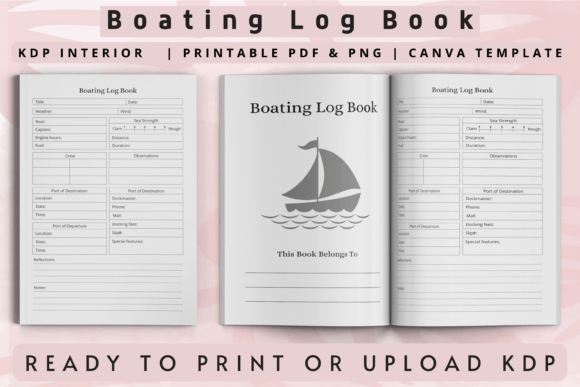
Keeping a detailed record of time on the water is something many boaters overlook until they need it most. A log book helps you track fuel usage, engine hours, weather patterns, and maintenance schedules. Without one, you rely on memory, and that rarely ends well when you are trying to troubleshoot a problem or sell your vessel. The Boating Log Book KDP Interior is a ready-made template designed to help self-publishers create a professional, usable log book for boaters. It comes as a set of files, including PNG, PDF, PowerPoint, and Canva editable versions, in a 6 x 9 inch format with 120 pages and bleed. While it is a solid starting point, many people make avoidable mistakes when choosing, customizing, or uploading a template like this. Let us walk through what matters so you end up with a product that actually helps boaters, not one that collects dust.
What the Boating Log Book KDP Interior Actually Offers
At its core, this template is a low-content or no-content book interior. That means the layout is already done, and you add your own branding, cover, and perhaps minor tweaks before publishing on Amazon KDP. The pages include fields for recording weather conditions, location, fuel usage, and maintenance logs. For a boater, having a dedicated space for each trip makes it easier to spot trends, like rising fuel consumption that might signal an engine issue, or noticing that certain anchorages work better in specific wind directions.
For the self-publisher, the appeal is speed. You do not need to design every page from scratch. You upload the ready-to-use PDF, pair it with a cover, and you can list your book in a matter of hours. That said, speed is not always your friend if you skip important checks. Many people rush to publish and end up with a log book that feels generic, confusing, or mismatched to what boaters actually need.
Mistake One: Ignoring the Audience’s Real Needs
The most common error is assuming any log book works for any boater. A kayaker who paddles local lakes has different needs than a sailor crossing the Gulf Stream or a powerboater running charters. The Boating Log Book KDP Interior gives you a general structure, but you can and should tailor it. If you leave the field labels exactly as they are without considering who will use the book, the result can feel too vague for experienced boaters and too cluttered for beginners.
For example, a weekend fisherman might want space for catch records, tide times, and bait used. A cruiser might prioritize fuel stops, engine hours, and waypoints. If you publish a one-size-fits-all log book without segmenting your audience, you risk disappointing both groups. A better approach is to create a series. Use the same base template but adjust the prompts for different niches. Add a page for “Bait and Tackle Notes” in one version, and “Engine Hours at Cruise RPM” in another. That small effort turns a generic interior into something boaters actually recommend to friends.
Mistake Two: Overlooking Formatting and Bleed Issues
The template comes in 6 x 9 inches with bleed. That is a standard size for KDP paperbacks, but bleed is not optional if your design has elements that go to the edge of the page. Some self-publishers upload the PDF without checking how the bleed renders. They end up with white slivers on the edges of their book, or worse, content gets cut off because the printer trims too close. Always test the PDF by uploading it to KDP’s previewer before you hit publish. Look at every page, especially where lines or borders meet the edge. If anything looks off, adjust the file before listing.
Another formatting slip is forgetting that the interior needs a consistent margin for the spine. With 120 pages, the spine will be thin, but KDP still calculates a minimum margin based on page count. If your template has content too close to the spine, readers will have to bend the book open to read it, which is frustrating. Use KDP’s built-in guide or a tool like the Canva editable file to adjust margins if needed.
Mistake Three: Treating It as a “Set It and Forget It” Product
Low-content books require less work than full manuscripts, but they still benefit from thoughtful touches. Many people download the Boating Log Book KDP Interior, add a cover, and call it done. That is a missed opportunity. Readers can tell when a book was assembled in five minutes. The ones that sell well have coherent design, logical page flow, and small extras that show you care about the user’s experience.
Consider adding a brief introduction page explaining how to use the log book effectively. Maybe include a sample entry so new boaters see what a completed log looks like. You could also add a page for annual summaries or a checklist for pre-departure safety checks. These additions do not require heavy design work. You can edit the PowerPoint or Canva file directly, insert a few text boxes, and export a new PDF. That small investment in time can make your book feel more valuable than a dozen competitors that offer the same bare layout.
Mistake Four: Ignoring File Type Flexibility
You receive PNG, PDF, PowerPoint, and Canva editable files. Some self-publishers stick to the ready-made PDF because it is the easiest path. That is fine if it meets your needs, but the other formats are there for a reason. If you want to change fonts, add your own branding colors, or rearrange page order, the Canva or PowerPoint file gives you that control. The PNG files can be useful for previews or marketing materials, but they are not suitable for print unless you handle resolution carefully.
A practical tip: open the PowerPoint file first and explore the layers. You will often find that each page element is placed on a separate layer, making it easy to move or hide things. If you are comfortable with Canva, the editable link saves you from importing and reformatting. Pick the format that matches your skill level, but do not limit yourself to the PDF just because it is the default option.
Mistake Five: Forgetting About Metadata and Listing Quality
You can have the best log book interior in the world, but if your Amazon listing does not clearly communicate its purpose, boaters will not find it. Many self-publishers focus entirely on the interior design and neglect keywords, categories, and the product description. The Boating Log Book KDP Interior is a template, so your job is to build a complete product around it.
Write a description that speaks directly to the boater’s pain points: forgetting maintenance intervals, losing track of fuel costs, or not having records when selling the boat. Use natural language that includes phrases like “boat maintenance log,” “fuel usage tracker,” and “boating trip journal.” Avoid keyword stuffing because Amazon’s algorithm penalizes that. Instead, write a clear, helpful description that answers the question “Why would I want this book?”
Choose categories that make sense. “Sports & Outdoors > Outdoor Recreation > Boating” is one path, but also consider “Books > Crafts, Hobbies & Home > Home Improvement & Design > How-to & Home Improvements” or “Books > Reference > Encyclopedias & Subject Guides > Transportation.” Test different category combinations based on what similar successful books use.
Also pay attention to the look inside feature. KDP allows you to set the percentage of the book that shows in preview. Make sure the first few pages are clean, well designed, and give a realistic impression of the full book. If the preview shows a title page and then jumps to a generic log entry, readers may not feel compelled to buy. Include a brief table of contents or an inviting first page that demonstrates the value.
What to Check Before You Publish
Before you upload the Boating Log Book KDP Interior for publication, run through a short checklist. First, verify the bleed settings and margins using KDP’s previewer. Second, print one copy for yourself using the proof option. Holding a physical book reveals issues that a screen cannot, such as whether the binding hides text or if the paper weight feels flimsy. Third, test the usability of the log prompts. Ask a friend who boats to fill out a few pages and tell you if any fields are confusing. Fourth, check that the file type you upload matches KDP’s requirements. The ready-to-upload PDF should be formatted at 6 x 9 inches with visible bleed if your design uses it.
If you plan to edit the Canva or PowerPoint file, keep a backup of the original. It is easy to accidentally delete a line or shift a margin, and having the untouched version saves you from starting over. Also, consider creating a separate file for each niche version so you do not mix up different layouts later.
A Better Approach to Using This Template
Think of the Boating Log Book KDP Interior as a foundation, not a finished house. The template gives you a structural start, but your success depends on what you build around it. Focus on a specific type of boater. If you target sailboat cruisers, adjust the log fields to include wind speed, sail changes, and anchor details. If you target fishing guides, add space for catch data, bait logs, and client notes. That level of specificity signals that you understand the audience, and it creates a product that feels worth the price.
Add small design touches that improve the user experience. Use a readable font at 10 or 11 points. Include a subtle header or footer with the book title and page number. Make sure the binding margin is at least 0.5 inches. These details might seem minor, but they collectively tell readers that the book was made with care. And in the competitive low-content space, care is what separates a product that sells from one that languishes.
Finally, be patient. Low-content books often take time to gain traction. Use Amazon’s advertising tools to test interest, encourage reviews from early readers, and update your listing based on feedback. The template is a tool, but your attention to the audience, the design, and the listing details will determine whether your boating log book becomes a resource that boaters reach for every trip.